E-invoices in B2B commerce: XRechnung and ZUGFeRD with Shopware
XRechnung or ZUGFeRD for a B2B store? We explain the differences, German deadlines and three ways to generate and send structured e-invoices with Shopware.

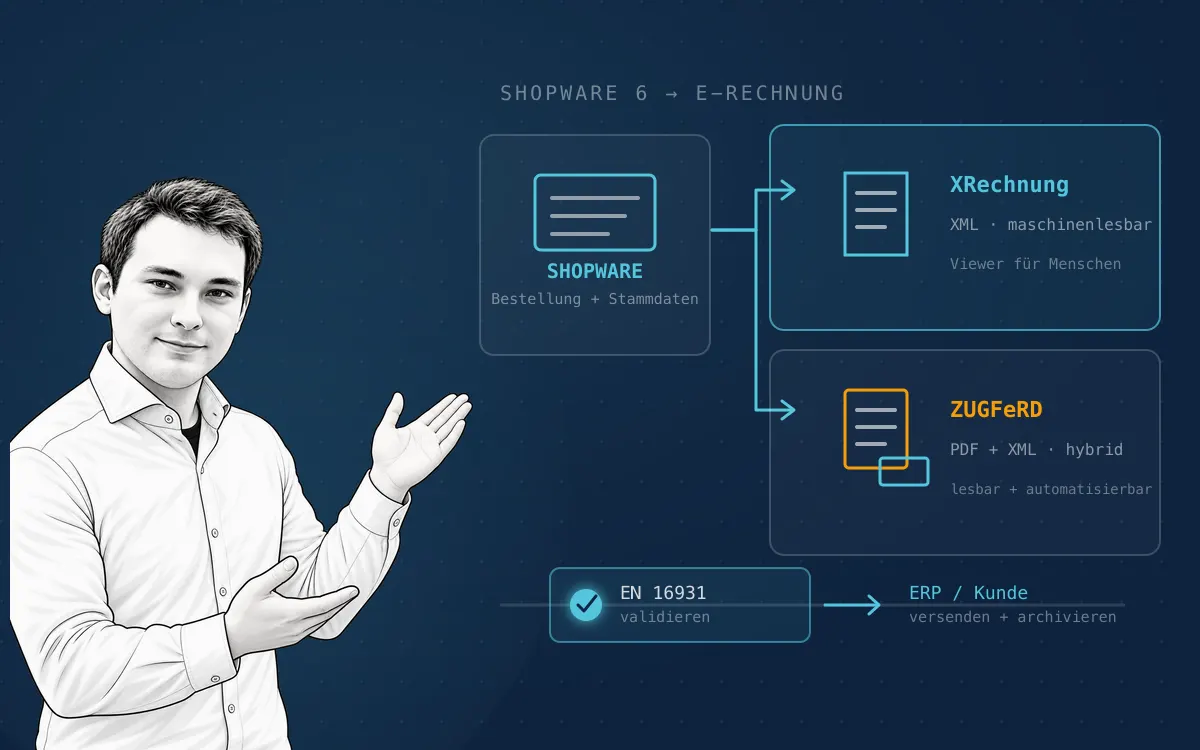
A PDF invoice sent by email is easy to read, but it is not a structured e-invoice under section 14 of the German VAT Act (UStG). Since 1 January 2025, domestic German businesses must be able to receive e-invoices, and from 2028 issuing them becomes mandatory for domestic B2B transactions — while Shopware 6 generates ZUGFeRD documents natively since version 6.6.10.0. XRechnung requires an extension or ERP integration depending on the target process.
For the recipient, a plain PDF still means extracting, checking and transferring its data into an ERP. An e-invoice stores invoice data in a structured format that software can process directly.
For a B2B store operator, this is not only a file-format decision. The invoice must be created from correct order, customer, tax and payment data, generated for the right business event, pass a technical validation and reach the recipient reliably.
Shopware can support this process. The right solution depends on the Shopware version, B2B process, ERP, target format and the requirements of business customers. This article explains XRechnung and ZUGFeRD, the German transition deadlines and three ways to implement them with Shopware 6.
What is an e-invoice?
An e-invoice is not simply any invoice sent digitally. A PDF is a “different invoice” unless it also contains a structured data part. An e-invoice must transmit invoice information in a structured electronic format that can be processed automatically.
In Germany, permitted formats are based on the European EN 16931 standard. XRechnung is a purely structured XML format. ZUGFeRD combines a human-readable PDF with embedded structured XML data. With ZUGFeRD, both parts belong to one file.
The structured data has priority: if the XML and the visual PDF part of a hybrid invoice differ, the XML is authoritative. Invoice generation and validation must therefore be designed together.
XRechnung and ZUGFeRD compared
The core difference: XRechnung is pure, machine-oriented XML based on EN 16931 with German business rules; ZUGFeRD combines a readable PDF/A-3 with embedded XML in one file. Both qualify as e-invoices — which standard fits is decided by recipient requirements and the ERP processes on both sides.
| Format | Structure | Human readability | Typical use |
|---|---|---|---|
| XRechnung | XML based on EN 16931 and German business rules | Not directly readable; a viewer is needed | ERP and public-sector processes, automated inbound processing |
| ZUGFeRD | PDF/A-3 plus embedded XML | PDF is readable, XML is machine-readable | B2B invoices where people and systems use the same file |
XRechnung: structured and machine-oriented
An XRechnung does not contain a PDF view. That is consistent for automated invoice intake, but changes the human workflow: the recipient needs an XML viewer or an ERP. A B2B customer can therefore explicitly request XRechnung even if ZUGFeRD would also be technically valid.
In B2B, an invoice generally does not need a Leitweg-ID. That routing identifier belongs to B2G invoices addressed to public authorities. Buyer references, purchase order numbers or customer numbers can still be required by the recipient and must be available in the data model.
ZUGFeRD: PDF and XML in one file
ZUGFeRD is a pragmatic starting point for many B2B processes: the recipient opens the PDF as usual while the ERP processes the XML. To qualify as an e-invoice under the applicable rules, the ZUGFeRD profile must meet EN 16931. The MINIMUM and BASIC-WL profiles are not sufficient for that purpose; an EN-16931-conformant profile such as COMFORT or its current equivalent is typically used.
Which deadlines apply in Germany?
The deadlines in brief: Since 1 January 2025, domestic businesses must be able to receive e-invoices — an email inbox is sufficient in principle, and there is no general receiving exemption for small businesses. For issuing, transition rules apply: other invoice formats remain permitted until the end of 2026, or until the end of 2027 where the previous year's turnover was no more than €800,000; from 2028, e-invoices are mandatory for domestic B2B transactions in the normal case. The legal basis is section 14 UStG; the details are set out in the Federal Ministry of Finance FAQ and the BMF application letter.
The rules concern transactions between domestic businesses; exceptions such as small-value invoices need separate review. Transition periods are not a reason to postpone preparation: customers, ERP and accounting need time for testing and process changes.
The current legal assessment should always be confirmed with a tax or legal advisor. This article describes the technical implementation and is not tax advice.
What does Shopware 6 provide natively?
Shopware has added e-invoicing to its document workflow in stages. According to Shopware, the core supports ZUGFeRD documents from Shopware 6.6.10.0. The structured data can be provided as a separate XML file or embedded in the PDF. From Shopware 6.7.9.0, additional document types can be created in ZUGFeRD, including credit notes and cancellation documents.
The normal Shopware documents remain the basis: invoice, cancellation invoice, credit note and delivery note. The Shopware document settings configure business data, layout and the order information displayed. ZUGFeRD variants use these data sources.
This does not mean that every installation immediately generates every desired XRechnung. The native document workflow particularly covers ZUGFeRD. For XRechnung, the appropriate route may be an extension, an ERP or a custom integration. The important question is not the plugin name, but whether it supports the required Shopware version, profile, correction and cancellation cases, tax logic and B2B data.
Three implementation routes for XRechnung and ZUGFeRD
Three routes lead to e-invoicing with Shopware: the core route for ZUGFeRD (from 6.6.10.0), an extension for XRechnung and mixed requirements, or an ERP-led or custom integration where the ERP is the system of record for invoices. Which route fits depends on the Shopware version, target format and system landscape.
1. ZUGFeRD with the Shopware core
For a B2B store on a current Shopware 6 version, the core route is the smallest step if ZUGFeRD is sufficient. The invoice is generated from the existing order process; the appropriate ZUGFeRD variant is added, either embedded or as separate XML.
Before production, verify at least:
- complete seller and buyer addresses,
- VAT ID and tax category,
- invoice number and date,
- line items, quantities, prices and tax amounts,
- payment terms, method and due date,
- purchase order number or other buyer reference,
- shipping costs, discounts, credit notes and cancellations.
A visually correct PDF is not proof of a valid e-invoice. The XML must be validated against the relevant business rules and tested with real-world business cases.
2. An extension for XRechnung and mixed requirements
If customers explicitly request XRechnung or you need additional profiles, document types and automated delivery rules, a Shopware extension is often the right route. The Shopware Extension Store offers solutions for XRechnung and ZUGFeRD. They extend the document process, generate XML and can vary output by customer, country, tax case or order status.
Choosing one is an architecture decision, not a simple installation task. Check:
- supported Shopware version and upgrade path,
- XRechnung and ZUGFeRD profiles,
- automatic or manual document generation,
- PDF/XML email delivery and customer-account downloads,
- credit notes, partial cancellations and corrections,
- buyer references, Leitweg-ID fields and international tax cases,
- validation, logging and retry behaviour after delivery errors.
Test an extension in staging with anonymised or synthetic orders first. This protects against more than format errors: it also exposes side effects in number ranges, order states and email automation.
3. ERP-led or custom integration
In complex B2B stores, the ERP is often the system of record for invoices. Shopware transfers the order, the ERP creates and posts the invoice, and the ERP or a specialised e-invoice service sends XRechnung or ZUGFeRD. Shopware then makes the invoice available in the customer account or links it to the order.
This avoids duplicating invoice logic. It does require a robust state machine: what happens after a failed transfer, a correction, a partial cancellation or a delayed response? A unique external invoice ID, idempotency, error logging and a manual retry path matter more than another admin button.
Our Shopware development service covers these interfaces and custom document processes. For an existing store, the right starting point is a system audit, not immediately installing a plugin.
The technical flow in a B2B store
Whichever route you choose, a reliable flow follows seven steps: from identifying the business customer, through generating invoice and XML from the same source data and validating against EN 16931, to delivery, audit-proof logging and linking in the customer account. Simplified:
- The store identifies the business customer and provides customer, tax and reference data.
- The order is checked and posted in Shopware or the ERP.
- The system of record creates the invoice and XML from the same source data.
- The file is validated against EN 16931 and the selected profile.
- XRechnung or ZUGFeRD is sent through the agreed channel.
- Document ID, status and delivery errors are logged for audit and retry.
- Invoice, credit note or cancellation is linked in the customer account and, where appropriate, the ERP.
Do not convert a PDF into XML after the fact if the original line-item and tax data are still available. The structured invoice should be generated directly from the business data model.
Common implementation mistakes
Five mistakes dominate implementations: confusing PDF and XML, testing only the standard case, ignoring recipient requirements, validating only after sending, and treating the Shopware version and its extensions separately. Each of them surfaces only in live operation — and then expensively.
Confusing PDF and XML
A PDF emailed to a customer is not an e-invoice. A PDF with a QR code is not automatically an EN-16931-compliant invoice either.
Testing only the standard case
Tests must cover discounts, shipping, multiple tax rates, tax-exempt items, intra-community supplies, credit notes and cancellations—not only normally taxed goods with one delivery address.
Ignoring recipient requirements
A customer may require XRechnung, a specific profile, a purchase order reference or a particular delivery channel. Before rollout, create a small recipient profile with format, profile, channel, mandatory fields and an error contact.
Validating after sending
The recipient's ERP is not a test environment. Validate before delivery and, ideally, as part of automated document generation.
Treating version and extensions separately
E-invoicing touches documents, taxes, orders, status flows, email, customer accounts and often the ERP. Changes in one area can alter another. Shopware support and maintenance with staging tests and controlled releases reduces that risk.
A practical introduction plan
The introduction plan follows five steps: collect recipient requirements, choose the system of record, close data gaps, test formats and integration, and monitor delivery and archiving. The order is deliberate — starting with the plugin instead of the recipients means testing past the actual need.
1. Collect recipient requirements
Which customers require XRechnung? Is ZUGFeRD sufficient? Which profiles, references and delivery channels are expected?
2. Choose the system of record
Is the invoice created in Shopware, the ERP or a specialist e-invoice service? Two systems must not independently generate invoice numbers and tax data.
3. Close data gaps
Check company name, addresses, VAT ID, customer number, purchase order reference, tax logic, payment terms and product master data. Missing data is usually the real e-invoice project.
4. Test format and integration
Generate both formats, validate them and have the most important recipients or their ERP check test files. Include corrections and cancellations.
5. Monitor delivery and archiving
Record generation, validation, delivery, retry and failure. An e-invoice is a stable process only when exceptions are handled as deliberately as the happy path.
Conclusion: Shopware can produce e-invoices—the architecture decides
Shopware 6 now provides a native basis for ZUGFeRD. XRechnung, complex recipient profiles and ERP-led invoicing require an extension or custom integration depending on the setup. In every case, the file is only the visible part. Correct B2B master data, tax-consistent cases, validation, error handling and clear ownership determine whether the process works.
Our F.O.C.U.S. system starts with Facts: What data and systems actually exist? We then define the objective, expose integration constraints, implement the right route and operate it in a controlled way. That turns e-invoicing into a reliable part of B2B commerce rather than an isolated plugin.
Official sources
Let's talk about your system.
No pitch deck. A conversation with the people who build.