PHP2Shell: what the critical PHP flaw means for Shopware stores
Two critical RCE flaws in PHP (CVE-2026-109618, CVE-2026-109619, CVSS 9.2) affect every Shopware store. What to do now — and why no Shopware update fixes them.

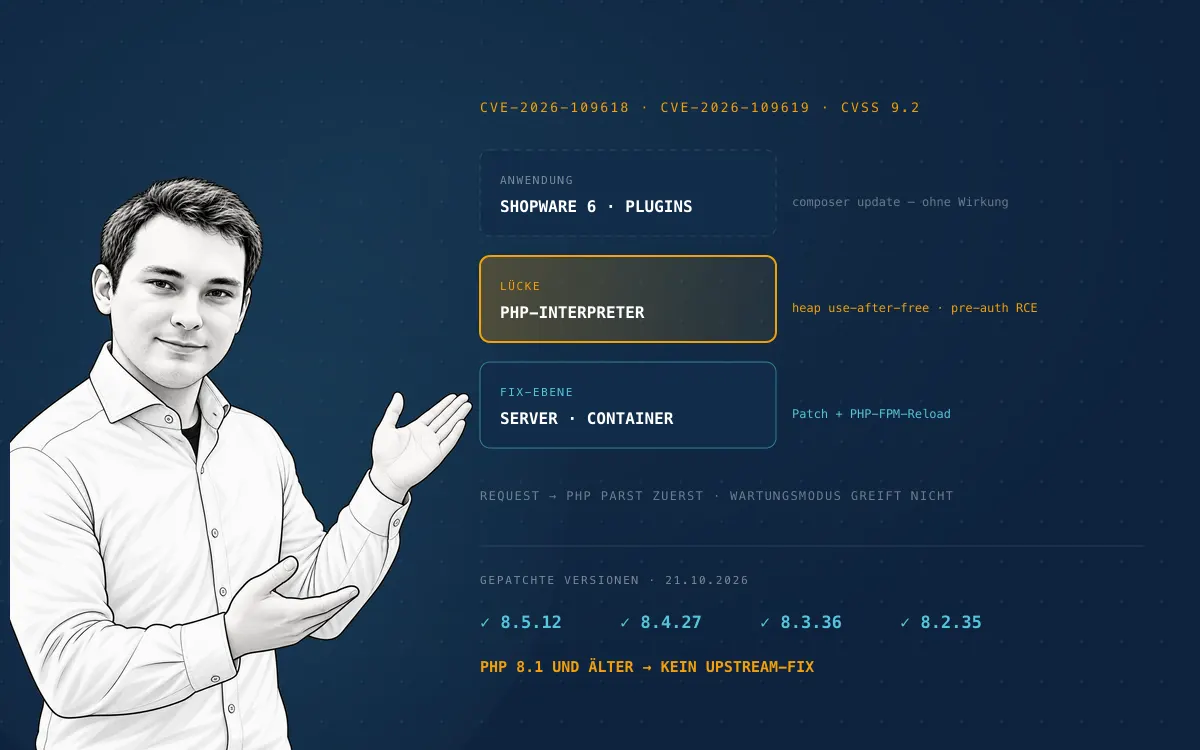
On 20 October 2026, details about two critical vulnerabilities in the PHP core leaked ahead of the planned patch. The PHP project shipped the security releases on 21 October at 14:00 UTC.
The flaws are tracked as CVE-2026-109618 and CVE-2026-109619, are publicly known as "PHP2Shell", and are rated CVSS v4.0 9.2 by the PHP security team. Germany's federal cyber security agency BSI lists them in its cyber security warning at criticality 3 of 4 ("orange") — measures must be taken immediately.
For Shopware merchants, the most important news is the uncomfortable one:
the flaw is not in Shopware. It is in PHP. No composer update, no
Shopware release, and no plugin update closes it.
The situation in brief
- What: Two remote code execution flaws in the PHP core. The publicly demonstrated attack path is a heap use-after-free in the session upload progress mechanism.
- Who is affected: According to security researchers at Sansec, every web server running PHP 5.4 or later — which in practice means every Shopware, Magento, and WooCommerce store, plus WordPress, TYPO3, Joomla!, and Drupal.
- Attack prerequisites: Per the BSI, neither authentication nor user interaction. An attacker only needs the URL.
- Patched: PHP 8.5.12, 8.4.27, 8.3.36, and 8.2.35 (21 October 2026).
- Not patched by php.net: PHP 8.1 and older. Those branches are end-of-life and receive no upstream fix. Several distributions backported the fix anyway — details in the update below.
- Time pressure: Sansec expected mass exploitation within 15 minutes of the release; the BSI expects broad exploitation within hours. The BSI states that no reliable workarounds are known.
Why this affects every Shopware store
Shopware is a PHP application. The vulnerable code sits one layer below it — in the interpreter that processes every incoming request before Shopware even boots.
Three consequences are being underestimated right now:
A Shopware update does not help. The flaw cannot be closed from within the store codebase. The fix has to happen at server, container, or hosting level.
Maintenance mode does not help. Sansec points this out explicitly: PHP parses every request before the application checks its maintenance flag. A store in maintenance mode is just as exploitable as an open one.
A "small" secondary store is not a small risk. Every PHP instance on the
same infrastructure is an entry point: the old Shopware 5 store on a
subdomain, the WordPress blog, the staging environment, the forgotten tool
under /tools. Patching only the main store leaves the door next to it open.
Which PHP version needs which update?
| PHP branch | Status | Fix version | Action |
|---|---|---|---|
| 8.5 | active | 8.5.12 | apply immediately |
| 8.4 | active | 8.4.27 | apply immediately |
| 8.3 | security fixes only | 8.3.36 | apply immediately |
| 8.2 | security fixes only | 8.2.35 | apply immediately |
| 8.1 and older | end-of-life | no upstream fix | check for a distro backport, else upgrade or take offline |
Exact version numbers and release dates are in the PHP ChangeLog. One practical note: distributions and hosting providers ship the packages with a delay. The relevant question is not "has PHP patched?" but "is the patch running on my server?".
Update, 22 October 2026: how far back the patches go
One day after patch day the question can be answered precisely — and the answer is better for older stores than it looked on 21 October.
php.net ships fixes for the four supported branches only: 8.5.12, 8.4.27, 8.3.36, and 8.2.35. Every lower version in those branches is vulnerable, and PHP 8.1 and older get nothing from the PHP project. How long a branch receives security fixes at all is listed under supported versions: PHP 8.2 ends on 31 December 2026, 8.3 on 31 December 2027, 8.4 at the end of 2028, and 8.5 at the end of 2029. Patching to 8.2.35 today buys two months, not two years.
Distributions and hosting providers patched considerably further back — through backports that leave the PHP version number untouched:
- Ubuntu ships the fix for 22.04 LTS (PHP 8.1), 24.04 LTS (8.3), and 26.04 LTS (8.5) under standard support. For 20.04 (7.4), 18.04 (7.2), 16.04 (7.0), and 14.04 (5.5) it is only available with Ubuntu Pro / ESM.
- AlmaLinux updated the php:7.2, 7.3, 7.4, 8.0, and 8.2 module streams on EL8 and 8.0, 8.1, 8.2, and 8.3 on EL9 — explicitly noting that for retired streams a next time is not guaranteed. RHEL and Rocky have their own advisory status.
- Commercial extended support (e.g. TuxCare ELS) covers PHP 8.1, 8.0, 7.0–7.4, and 5.x.
- Control panels followed: cPanel/EA4 and Plesk rebuilt their PHP packages, legacy branches included.
None of this should be assumed, though: not every vendor backports, and for some distributions older PHP branches were listed as "no fix planned" on release day. The question for the hosting provider stays the same — is there a patched package for exactly this PHP version, and is it installed?
The practical consequence: php -v alone proves nothing. A backport does
not raise the version number. A patched Ubuntu PHP still reports 8.1.x, a
patched AlmaLinux PHP still reports 8.1.32. Verification therefore goes
against the package version and build date:
dpkg -l | grep -E '^ii +php[0-9.]*-(cli|fpm)'                                    # Debian/Ubuntu
rpm -q php-cli php-fpm --qf '%{NAME} %{VERSION}-%{RELEASE} %{BUILDTIME:date}\n'  # RHEL/AlmaLinux
Only with the official Docker images is the version number meaningful again —
there the patched tags are 8.5.12, 8.4.27, 8.3.36, and 8.2.35.
The hard case: stores on unsupported PHP
This is where a patch day turns into a strategy topic.
Shopware 6.7 supports PHP 8.2 to 8.4, and Shopware 6.6 requires at least PHP 8.2. Stores that are current there get a patch and can apply it.
Shopware 6.5 still ran on PHP 8.1 to 8.3. Any 6.5 store still operating on PHP 8.1 is left without an upstream fix — whether a patch exists at all is up to the distribution. Shopware 5 stores on PHP 7.x are in an even worse position — Shopware 5 has been end-of-life since July 2024 and receives no security updates itself.
Those stores have three options, and "wait and see" is not among them:
- Upgrade PHP to a patched branch — technically the right move, but it requires a Shopware version that supports the newer PHP.
- Temporarily disconnect from the internet — the BSI explicitly names taking the web server offline as an option where immediate patching is not possible.
- A backport from the distribution or an extended-support vendor — Ubuntu Pro/ESM, the RHEL-compatible module streams, and ELS vendors such as TuxCare covered PHP 8.1, 8.0, and 7.x. Your hosting provider has to confirm this reliably, not "probably" — and it extends the store's runway, it does not answer the EOL question.
Anyone discovering today that their PHP version belongs in the third row of that table does not have a security problem from today; they have a migration problem from the day before yesterday. Whether and when a migration to Shopware 6 is necessary is a separate article.
Working through it with F.O.C.U.S.
An incident like this is exactly the moment that reveals whether a store is being operated or merely running. We work through situations like this using our F.O.C.U.S. system — not because an acronym makes the patch faster, but because the sequence stops the important things from being forgotten under pressure.
Facts — inventory before action
The first question is not "how do we patch?" but "where is PHP running at all?". What to record:
- The PHP version per service: check
php -v(CLI) andphp-fpm -vseparately — many servers run different builds. - Every environment: production, staging, preview, development servers.
- Every instance: main store, secondary stores, subdomains, blog, admin tools, cron and worker containers.
- The delivery path: distribution package, Docker image, hosting panel, PaaS.
php -v
php-fpm -v
php -i | grep -i 'session.upload_progress'
Without that list you are not patching, you are guessing.
Objectives — a target, not an intention
"We'll take care of it" is not an objective. This is: every internet-exposed PHP instance runs a patched version by 22:00 today — verified, not assumed. Plus a second objective: a documented decision for every instance that cannot reach it.
Constraints — put the limits on the table
Typical blockers that surface now:
- Stores on PHP 8.1 or 7.x with no upgrade path.
- Plugins untested on a newer PHP version.
- No staging environment to validate the patch on first.
- A hosting provider without a defined response time.
- Nobody with deploy permissions reachable.
Each of these is a decision someone has to make — usually a trade-off between downtime risk and compromise risk. With the PHP2Shell risk profile, patching normally wins.
Execution — patch, restart, verify
The step most often left half done:
- Update the PHP packages or rebuild the container image
(
docker compose build --pull --no-cache, then restart). - Restart or reload PHP-FPM. Without a restart the old interpreter stays in memory — the package is current, the process is not.
- Verify the version against the running process, not against the package list — and with distro backports against the package version and build date, because the PHP version number stays unchanged there.
- Functional check: login, search, cart, checkout, payment, order export, workers, and cron.
Scaling — turn the emergency into a system
After the patch, the real question is: how long did it take — and why that long? A team that was done in 20 minutes has a pipeline, an inventory, and clear ownership. A team that needed six hours has none of those and will need six hours again next time.
The measures that change this are unspectacular: a maintained infrastructure inventory, automated patch pipelines, a staging environment that matches production, monitoring with alerting, and a maintenance retainer with defined response times. None of them prevents the next CVE. Together they decide whether it becomes a routine task or a crisis day.
When immediate patching is impossible
Several interim measures circulated before the release. For context: a PHP core developer stressed that patching is the only reliable mitigation, and the BSI states that no reliable workarounds are known. The steps below buy time; they do not solve the problem:
session.upload_progress.enabled = 0
session.use_strict_mode = 1
Blocking multipart/form-data requests at web server or WAF level was also
discussed. For a store that is a heavy-handed intervention: admin file
uploads, image uploads in configurators, and some payment and integration
callbacks can break. Defensible as a bridge for a few hours, not as a
permanent state.
And once more, because it is the most common misconception: Shopware's maintenance mode is not a mitigation.
Was my store compromised?
Because the details became public before the patch, there is a window in which vulnerable servers were reachable — Sansec documents first exploitation attempts on the morning of 21 October, before the patch was published. For stores exposed during that window, patching alone is not enough. Things to check:
- New or modified PHP files in the web root, in
public/,custom/plugins/, andvar/cache— compare timestamps against the last deploy. - Unexpected admin users, integrations, and API keys in Shopware.
- Outbound connections and new cron entries.
- Web server logs for unusual
multipart/form-dataPOST requests. - Payment and order data for tampering, especially JavaScript injected into the checkout (skimming).
A confirmed breach is its own process: isolate, preserve forensic evidence, rebuild from a clean state, rotate credentials, and assess notification duties under Art. 33 GDPR. Applying a patch on top of a compromised system removes the vulnerability, not the attacker.
What this day says about store operations
PHP2Shell is not a Shopware problem, but it is a perfect stress test for Shopware operations. The stores that were done within half an hour today did nothing magical — they knew which PHP versions were running where, had a way to update them, and had someone allowed to do it.
That is precisely the scaling phase in F.O.C.U.S.: go-live is not the success, it is the starting point of responsibility. Security updates do not belong in the "when there's time" category but in the same one as uptime and checkout conversion — measurable, owned, plannable. The same ingredients show up in our Shopware 6.8 outlook: document the infrastructure, automate core tests, reserve release windows.
Conclusion
- Check the PHP version of every internet-exposed instance — CLI and FPM separately.
- Update to 8.5.12, 8.4.27, 8.3.36, or 8.2.35 and restart PHP-FPM.
- Verify against the running process, not the package list — with backports, against the package version and build date.
- Instances on PHP 8.1 or older: check for a distro backport (Ubuntu Pro/ESM, RHEL streams, ELS), otherwise decide on an upgrade path or take them offline.
- If exposed during the leak window: run a compromise assessment.
- Then draw the lesson — inventory, pipeline, retainer.
The vulnerability was not avoidable. The response time is.
Official sources
- BSI cyber security warning 2026-297981-1032 — critical PHP vulnerabilities
- PHP ChangeLog 8.x — security releases
- PHP: supported versions
- Ubuntu Security: php2shell — available fixes incl. ESM
- AlmaLinux: php2shell — patched PHP packages released
- Sansec: critical PHP RCE CVE-2026-109618 and CVE-2026-109619
- Shopware 6.7 update guide — supported PHP versions
Let's talk about your system.
No pitch deck. A conversation with the people who build.