The warranty label in a modal: may it appear only on click?
Nested display on click or mouseover: the regulation explicitly allows it for the GARAN label and says nothing about it for the warranty notice. The legal position, the Shopware update you need and the new inline option in 6.7.15.1 and 6.6.10.28.

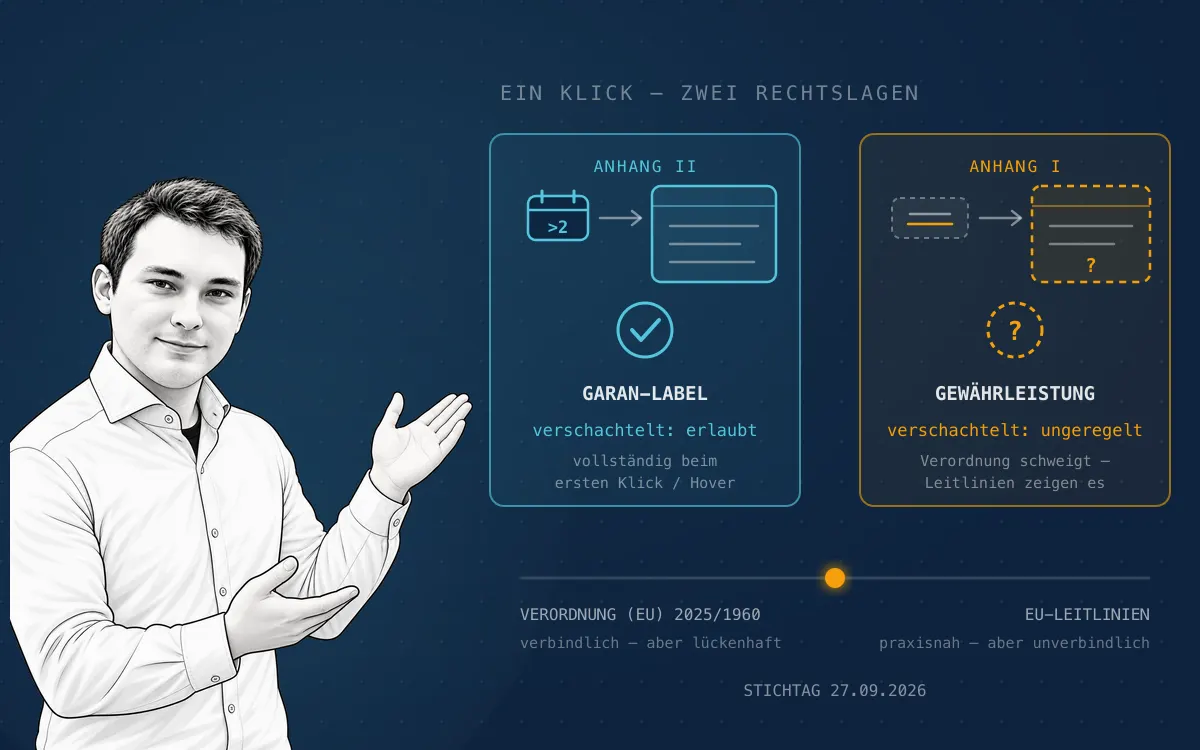
It is the question that comes up in every warranty label implementation project as soon as design enters the room: does the official graphic really have to sit large and permanent in the page — or is a compact icon enough, a speaking link, a modal that opens on click? The honest answer: it depends which of the two labels you mean. For the product-specific GARAN label, the implementing regulation explicitly permits nested display. For the harmonised warranty notice, it says nothing at all. And into that gap the European Commission has placed guidelines that suggest the opposite of what leading law firms read out of the regulation's text. For Shopware shops, though, the question eased considerably in October 2026 — but only for those who have installed the right update.
This post is explicitly not legal advice. It assesses an open legal question that no court has yet decided, from a technical and practical point of view — nothing more. We are a Shopware agency, not a law firm, and we neither may nor want to give legal advice on an individual case. Only a lawyer looking at your specific business model can judge which risk is acceptable for your shop. Have your chosen implementation reviewed by counsel before 27 September 2026 — responsibility for compliance stays with you as the merchant.
First, the terms: which "label" are we talking about?
Much of the confusion starts with the naming. Implementing Regulation (EU) 2025/1960 governs two separate markings in two separate annexes:
- Annex I — the harmonised notice about the statutory legal guarantee. Site-wide, product-independent. The market calls it the "warranty label"; in our posts we call it the warranty notice.
- Annex II — the harmonised label for the commercial durability guarantee, the GARAN label. Product-specific, only where a free manufacturer guarantee exceeds two years.
We described the substantive distinction in Warranty notice vs. GARAN label. For the modal question it is decisive, because the regulation treats the two differently — and whoever says "label" without saying which one inevitably gets the wrong answer.
The short answer
| Warranty notice (Annex I) | GARAN label (Annex II) | |
|---|---|---|
| Nested display | not regulated — contested | explicitly allowed |
| Basis | silence of the regulation | regulation + recital 14 |
| EU guidelines | show link + pop-up | show nested display |
| Risk position | residual risk until the first ruling | settled |
| Pragmatic recommendation | enable the inline option (from 6.7.15.1 / 6.6.10.28) | preview + modal possible |
What the regulation explicitly allows — and for which label
For the GARAN label the position is clear. For distance contracts concluded through an online interface, the label may be shown in a nested format. The condition is precisely worded: the complete label must appear in full on the first mouse click, the first mouse rollover or the first touch or tap on a touchscreen. The official EU business information confirms this for the GARAN label: it may be displayed in a nested format that unfolds on a mouse click or on hover.
Translated into UI language: a compact badge below the buy box that opens a modal with the complete label on click is, for the GARAN label, the route the regulation intends — not a tolerated compromise. What matters is the single interaction: anyone who has to click, then scroll, then open another tab is outside the rule.
For the notice under Annex I, no comparable permission exists. On this point the regulation simply makes no statement about nested display.
How the silence produced two camps
Legally, that silence can be read in two directions — and that is exactly what is happening now.
Position 1: by inverse reasoning — not permitted. The legislator regulated nested display for the label explicitly and for the notice not at all. Drawing that distinction is taken to be deliberate. IT-Recht Kanzlei takes this line clearly and recommends the directly perceptible graphic — "that is, not via a link or reference", in a size that makes the content immediately readable, with no pop-up, no preview icon, no expand mechanism.
Position 2: the Commission's guidelines. The same institution that issued the regulation has published practical guidelines together with vector files — and for the warranty notice they show precisely what position 1 rules out: a speaking link, for example "Your legal guarantee rights", which opens the complete official graphic on the first click or on hover — on category pages, in the header, in the checkout. IT-Recht Kanzlei has addressed this contradiction itself and described it as a diametral difference within one and the same institution.
The decisive point for risk assessment: guidelines are not legally binding. They may interpret the regulation, but they cannot change it. A court is not bound by them. Conversely, it would be awkward for a claimant to explain why an implementation the Commission itself depicts in its own practical guide should be unlawful. Until there is a ruling, residual risk remains in both directions — that is the honest state of play, and any source promising you certainty here is overselling.
What this means for Shopware shops concretely
This is where it gets interesting in practice, because the native Shopware feature from 6.7.14 and in the 6.6 backport has taken a position — and it sits on the guidelines' side:
- The warranty notice appears on the order confirmation page next to the terms checkbox; a link opens the full text in a modal. That is exactly the contested variant.
- The GARAN label appears below the buy box as a compact preview that opens the complete label on click, plus in the cart and on the order confirmation page. That is the uncontested variant.
Shopware describes the native implementation in its announcement on the GARAN label and EU warranty; we covered the step-by-step implementation in Warranty label 2026.
This produces a division of labour that surprises many projects: for the GARAN label you can trust the standard feature. For the warranty notice, the default setting already makes a risk decision for you — without anyone asking you about it. Shopware explicitly points out that legal compliance stays with the merchant.
Since October 2026: Shopware ships the inline variant
This is exactly where the situation eased in October 2026 — and it is the practically most important news in this post. Shopware has shipped a second setting that renders the complete notice without a modal, below the terms and conditions in the checkout:
core.cart.showLegalGuaranteeNoticeInline
The changelog states the decisive point plainly: the option displays the full
legal guarantee notice below the checkout terms when
core.cart.showLegalGuaranteeNotice is enabled — "the default display
remains a link opening the notice in a modal". So the setting is off by
default, and without it you stay on the contested modal variant.
It shipped with 6.6.10.28 (1 October 2026) and 6.7.15.1 (7 October
2026). Themes can control its placement through the blocks
page_checkout_confirm_legal_guarantee_notice_inline and
…_inline_bottom.
For Shopware shops, that turns the modal question from a development task into a checkbox in the cart settings. Anyone who wants to follow the cautious reading updates and switches the option on — that is all it takes.
The update without which none of this works
The whole discussion is academic as long as the shop runs on a version that does not know the feature at all. And it is incomplete if you only look at the minor version: with the GARAN label, the patch level decides which variants are available to you in the first place.
Which version brings what
| Version | Date | What was added |
|---|---|---|
| 6.7.14.0 / 6.6.10.24 | 09/10 Sep 2026 | Initial release: product fields, Store API routes, label in buy box, cart and confirmation mail, notice as a modal |
| 6.7.15.0 / 6.6.10.26 | 23 Sep / 1 Oct 2026 | Guarantee duration capped at 600 months, variants inherit the label confirmation, label sized correctly in the confirmation mail, banner for unmet prerequisites |
| 6.6.10.27 | 24 Sep 2026 | Order labels use the linked product ID |
| 6.7.15.1 / 6.6.10.28 | 7 Oct / 1 Oct 2026 | Inline option for the warranty notice, label as inline PNG in the mail, link from the privacy notices |
| 6.7.15.1 / 6.6.10.29 | 7 Oct 2026 | GARAN labels in mails via garanLabels instead of a Twig filter |
The practical recommendation as of October 2026: at least 6.7.15.1 or 6.6.10.29. Only there do you get the inline option, the corrected mail rendering and the variant inheritance together. A shop that updated to 6.7.14.0 in September and has stood still since has the feature — but not the choice between modal and inline.
What the update changes on its own
The update is not a pure feature toggle; it reaches into existing content. Three points regularly catch teams out:
- The notice is on after the update.
core.cart.showLegalGuaranteeNoticedefaults totrue, overridable per sales channel. That is intended — but it changes your checkout without you doing anything. - The terms and conditions snippets are swapped. The checkout then uses
checkout.confirmTermsTextWithGuaranteeinstead ofcheckout.confirmTermsText. If you overrode the terms text or the blockpage_checkout_confirm_tos_control_label, you have to adapt that override — otherwise the notice is missing exactly where it belongs, and nobody notices. - The confirmation mail is only migrated if it was never edited. As with
every mail template migration, it only applies where
updated_at IS NULL. Customised mail templates keep their content — the notice has to be added there by hand. This is the most common silent failure after the update.
Product data: the rules behind the label
The update adds two product fields, guaranteeMonths and
guaranteeConfirmed, both API-aware and inheritable by variants.
Validation is stricter than many expect:
- The guarantee duration must be greater than 24 months, divisible by 6 and at most 600 months — so 30, 36, 42 … months are valid.
- The label is rendered only when the confirmation is set and the duration, a manufacturer and a manufacturer product number are maintained. If one is missing, it stays invisible even though the switch is on.
- Since 6.6.10.26 / 6.7.15.0 the administration shows a banner naming the missing prerequisites — before that, it simply failed silently.
For large catalogues this is an import job from PIM or ERP, not per-product maintenance; the details are in Warranty label 2026.
Headless, custom themes and older versions
- Headless setups get two Store API routes:
GET /store-api/product/{productId}/garan-labelreturns the label as SVG,GET /store-api/legal-guarantee-noticethe notice graphic plus the link to the matching EU info page. The presentation — and with it the modal question — is yours to decide in your own frontend. - Custom storefronts do not show the new elements automatically if the core blocks are missing from the theme. Buy box, cart and checkout belong on the test plan after the update.
- 6.5 and older get no backport. There, only a plugin, a custom build or the upgrade remain — we weigh that up in Shopware 5 end of life.
The low-risk route: both, not either/or
The most workable solution is less spectacular than the debate suggests — and in case of doubt it costs nothing but layout space:
- Update to 6.7.15.1 or 6.6.10.29 and enable
core.cart.showLegalGuaranteeNoticeInline. That puts the official graphic in the checkout in full, with no custom development. - Add the nested link where there is no space — header, category pages, product listings. There it is an addition, not a replacement.
- Remove nothing the standard feature ships with. The modal in the checkout can stay; it is backed by the inline display, not replaced by it.
That satisfies both readings at once. The price is surface area in the checkout — the return is that the question no longer has to be decided for your shop.
If you do nest: requirements for the modal
Where nested display is permitted — beyond doubt for the GARAN label, and for the notice under the guidelines reading — "some modal" is not enough. These points decide whether the implementation holds:
- One interaction, not two. The complete label must appear on the first click, rollover or touch. No intermediate step, no second expansion inside the modal, no "show more".
- Complete and unaltered. Original format, prescribed orientation, no cropping inside the modal, no self-built replica, no removed GARAN wordmark.
- In colour. Online, colour display is prescribed — in the modal too, and in dark mode too. An inverted or greyscale asset does not meet the obligation.
- Readable without zoom. The modal must not force the graphic down to thumbnail size. On smartphones this is the most common failure.
- The speaking link has to speak. "Your legal guarantee rights" is meaningful; an "i" icon or a generic "more info" is not.
- Touch behaves differently from hover. A hover-only solution is no solution on mobile. Both have to work.
- Keyboard and screen reader. The modal must be focusable, dismissible by keyboard and exposed as a dialog. What is reachable only by mouse is not "easily accessible" — and in the EU it falls under accessibility requirements anyway.
- No consent layer in front of it. If cookie banners or overlays cover or block the modal, the information is effectively unavailable.
- Reachable before the order is placed. A modal that only exists on the thank-you page comes too late.
- No lazy-loading failure. Assets that load late inside the modal and stay blank on a slow connection do not show up in testing — they show up in production.
Your decision framework
Because there is no settled answer, this is a deliberate risk decision — one you should document rather than make implicitly in the theme:
| Risk appetite | Implementation of the warranty notice |
|---|---|
| Low (warning-letter-prone sector, high visibility) | update + enable showLegalGuaranteeNoticeInline, modal only as an addition |
| Medium | inline display in the checkout, nested link on category and product pages |
| Higher (lack of space, strong UX constraints) | keep the default: guidelines variant with a speaking link — with legal backing and a documented rationale |
For the GARAN label this trade-off does not apply: there, nested display is regulated, and the standard feature implements it correctly.
The full picture: compliance 2026/27 in the whitepaper
The modal question is one detail in a dense regulatory year. The withdrawal button, PPWR, CCD II and the Digital Product Passport fall into the same window; the overview is in E-commerce deadlines 2026/27 and in detail in the whitepaper:

Checklist: reviewing the modal implementation
- Does the shop run on 6.7.15.1 or 6.6.10.29 or newer — a version that knows the inline option at all?
- Has it been decided and documented whether
core.cart.showLegalGuaranteeNoticeInlineis enabled? - Were overridden terms and conditions texts and the block
page_checkout_confirm_tos_control_labeladapted after the update? - Does a customised confirmation mail contain the notice — the migration does not touch it?
- Are guarantee duration (> 24, divisible by 6, ≤ 600 months), manufacturer and manufacturer product number maintained per affected product, with the confirmation set?
- Is it clearly documented which of the two markings is displayed nested, and where?
- Does the complete label appear on the first interaction — click, hover and touch?
- Is the official graphic of the warranty notice additionally placed directly in the purchase path?
- Is the asset in the modal in colour, complete, unaltered and readable without zoom?
- Is the link labelled meaningfully rather than as a generic info icon?
- Does the modal work by keyboard, with a screen reader and without a consent layer in front of it?
- Is everything reachable before the order is placed — per language, on mobile and as a guest?
- Has the chosen variant been reviewed by a lawyer and the decision recorded?
Technically the modal question is an afternoon's work — legally it is open, and it will stay open until the first ruling. Embedding the official graphic directly as well takes the question out of your project without giving up clean UX. And once more, explicitly: this is our technical assessment, not legal advice — the legal evaluation belongs in a lawyer's hands. For the implementation in your shop, the update to 6.7.14 and the storefront review we help under Shopware support & maintenance.
Sources and further information
- Implementing Regulation (EU) 2025/1960: harmonised notice and label
- Directive (EU) 2024/825 (EmpCo) on empowering consumers for the green transition
- European Commission: practical guidelines and vector files for the EU notice and label
- European Commission: EU legal guarantee notice and GARAN label – information for business
- IT-Recht Kanzlei: is nested display allowed after all? (German)
- IT-Recht Kanzlei: dos and don'ts in the online shop (German)
- IT-Recht Kanzlei: FAQ on the warranty and guarantee label (German)
- Shopware: GARAN label and EU warranty – native features in 6.7.14 and 6.6
- Shopware release 6.6.10.28: inline option for the legal guarantee notice
- Shopware release 6.7.15.1: inline option and GARAN labels in mails
- Warranty label 2026: EmpCo obligation and Shopware 6 implementation
- Warranty notice vs. GARAN label
Let's talk about your system.
No pitch deck. A conversation with the people who build.